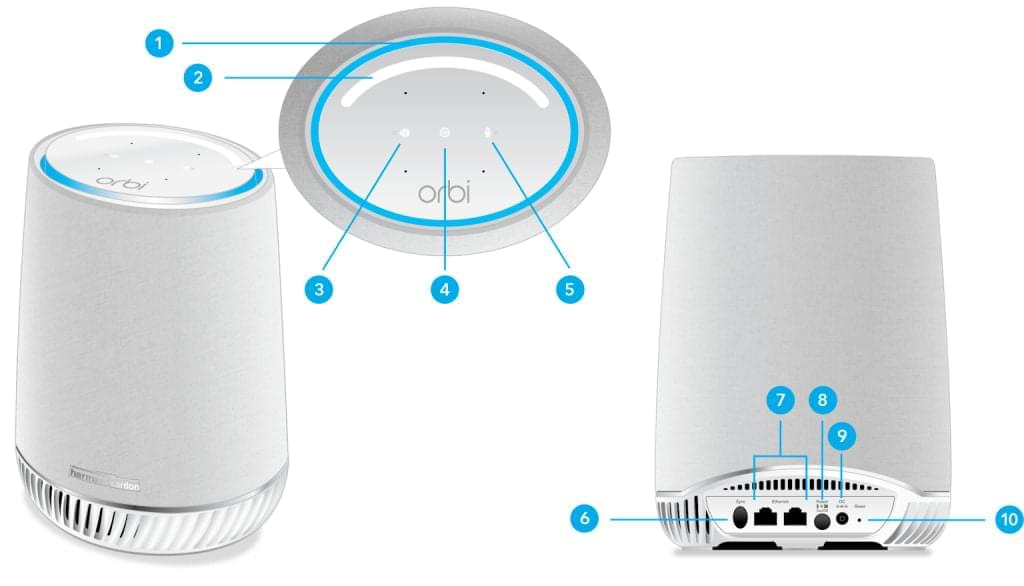
If your Netgear Orbi Satellite is not connecting to the router, your WiFi coverage may become unstable or completely unavailable in certain areas. This issue usually happens due to syncing problems, firmware mismatch, or poor placement.
Don’t worry — most Orbi satellite connection issues can be resolved quickly by following the steps below.
Why Is My Orbi Satellite Not Connecting?
- Satellite placed too far from the router
- Weak backhaul signal
- Firmware version mismatch
- Router not properly configured
- Temporary network glitch
- Interference from walls or electronic devices
How to Fix Orbi Satellite Not Connecting
1. Move Satellite Closer to the Router
During setup or troubleshooting, place the satellite in the same room as the router. Once connected successfully, you can move it to the desired location.
2. Check LED Light Status
- Solid Blue: Satellite successfully connected.
- Amber: Weak connection.
- Magenta/Pink: No connection to router.
3. Manually Sync the Satellite
- Press the Sync button on the Orbi router.
- Within 2 minutes, press the Sync button on the satellite.
- Wait for the LED to turn solid blue.
4. Restart Both Devices
- Turn off the router and satellite.
- Wait for 60 seconds.
- Turn on the router first and allow it to fully boot.
- Then power on the satellite.
5. Update Firmware
Log in to your router by typing orbilogin.com or 192.168.1.1 into your browser. Ensure both router and satellite are running the same firmware version.
6. Factory Reset the Satellite
If the problem persists:
- Locate the reset button on the satellite.
- Press and hold for 10–15 seconds using a paperclip.
- Wait for the satellite to reboot.
- Repeat the syncing process.
Tips to Prevent Future Connection Issues
- Keep firmware updated regularly.
- Place satellite midway between router and dead zone.
- Avoid placing near thick walls, microwaves, or large metal objects.
- Restart your network occasionally for optimal performance.
Conclusion
If your Orbi satellite is not connecting, the issue is usually related to placement, firmware, or sync errors. By carefully following the troubleshooting steps above, you can restore full mesh WiFi coverage quickly and effectively.
If none of the solutions work, advanced network configuration or professional technical assistance may be required.